
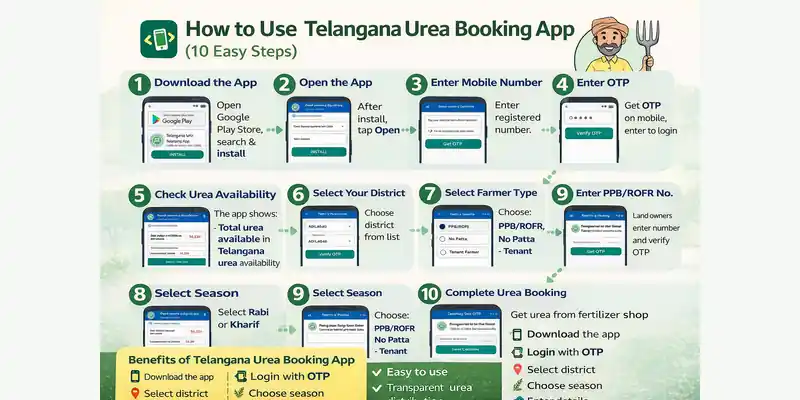
The Telangana Urea App helps farmers book urea easily using their mobile phones. The Telangana Agriculture Department launched this app to ensure fair and transparent urea distribution across the state. Using the app, farmers can check district-wise urea availability and complete booking without standing in long queues. Moreover, the app reduces delays, prevents misuse, and saves valuable time during the crop season. This guide explains how farmers can use the Telangana Urea App step by step in a very simple way.
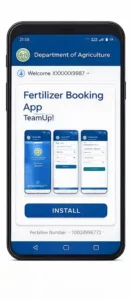
Step 1: Download the App
Open Google Play Store.
Search for Fertilizer Booking App and tap Install.
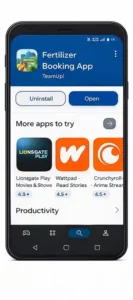
Step 2: Open the App
After installation, tap Open to start the app.

Step 3: Enter Mobile Number
Enter your registered mobile number in the app.

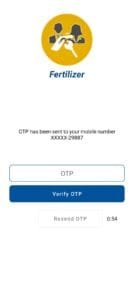
Step 4: Enter OTP
You will receive an OTP on your mobile.
Enter the OTP to log in.
Step 5: Check Urea Availability
The app shows:
Total urea available in Telangana
District-wise urea availability


Step 6: Select Your District
Choose your district name from the dropdown list. (If Your District Will not listed in the Pilot, the message will be shown below first image)

Step 7: Select Season
Select the farming season such as Rabi or Kharif.
Step 8: Select Farmer Type
Choose one option:
PPB/ROFR (land owner)
No Patta
Tenant Farmer
Step 9: Enter PPB/ROFR Number
If you selected PPB/ROFR, enter your Passbook number.
Tap Get OTP and verify.
Explanation:
PPB = Pattadar Pass Book
ROFR (ROR) = Record of Rights / Record of Forest Rights
The PPB/ROFR Number is the unique number printed on your Pattadar Passbook. It is linked to your land ownership details in the government database.
Why is it required?
To verify land ownership
To book urea and other subsidized fertilizers
To access government agriculture schemes
For OTP-based farmer authentication
Which option should you select?
PPB/ROFR → If you own agricultural land
No Patta → If you do not have land records
Tenant → If you cultivate land on lease/rent
Where can you find the PPB/ROFR Number?
On your Pattadar Passbook
On the Dharani Telangana portal
From MeeSeva or the Mandal Revenue Office (MRO)
Step 10: Complete Urea Booking
After verification, your urea booking is successful.
Collect urea from the assigned fertilizer shop.
Benefits of Telangana Urea Booking App
✔ Easy to use
✔ No long queues
✔ Transparent urea distribution
✔ Saves time and money
✔ Real-time stock information
In Simple Words
📱 Download the app
📲 Login with OTP
📍 Select district
🌾 Choose season
📘 Enter details
✅ Book urea easily